How do I create a log from scratch?
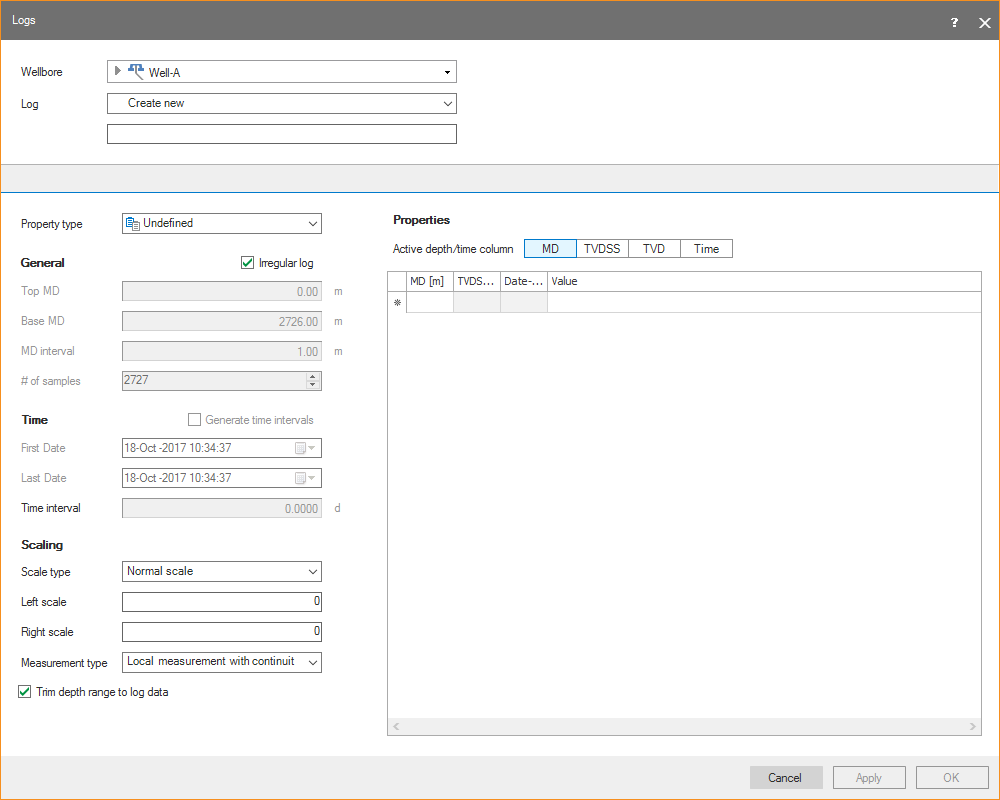
Go to DATA > Static Data > Static Data Preparation > Logs to open the Logs form. Click Create to open another Logs form where you can create a new log from scratch.
click to enlarge
You need to specify at least the following parameters:
- New log name
- The log Property type, for example Pressure or Density
- MD/TVDSS or TVDRT and the log values
The Property type acts as a template for you log. Its units (ft, cm, etc) can be specified the Property Dictionary (HOME > Settings > Dictionaries > Property Dictionary) but can also be adapted on the Logs form (right mouse click on Value and select Units).
You can create input log data in two modes: irregular or regular (check or uncheck the corresponding check box in the view). Irregular means that there is no fixed MD interval between the log values. If you select regular, you need to specify a start MD, end MD and an interval.
Finally, there are 3 different log measurement types available:
- Local measurement with continuity – These are the continuous logs, like GR and Density
- Local measurement – These are point data, such as LOT data point
- Boundary measurement – These are measurements that are valid for a certain interval, for example FACIES and ZONE properties
You can also use the Property Calculator to create (or modify) logs. Go to Tools > Property Calculator and then type any expression you want to create or calculate a property.